Your boards show the work. Pro shows the portfolio.

MWNN Kanban Pro connects your local boards into one view of where your attention goes, what is shipping, and what deserves focus next.

See what Pro adds Pricing & 14-day trial
Free

MWNN Kanban

The fast, file-backed board remains the foundation, and Pro unlocks inside it — there is no second extension to install. Install it from the Marketplace.

  • Local Markdown cards that live with your project
  • WIP limits, board roles, and card activity
  • Built for you and your AI agents: run a card or the whole board through Copilot, Codex, Claude Code, or Cursor Agent
  • No account, telemetry, or hosted board service
Pro

MWNN Kanban Pro

Cross-project insight and focus tools, unlocked inside the same extension.

  • A portfolio dashboard across every registered project
  • Automatic time tracking, including edits made outside the editor
  • Per-project allocation targets, drift, and debt, in tracked hours
  • Output in completed cards, hours per completed card, and cycle time by column role
  • A unified My Work queue spanning all your boards
  • The Portfolio AI Loop: run AI-assigned cards across every registered project
  • Focus sessions, drift nudges, timesheet corrections, CSV export, and a Review Digest

See the portfolio

Captured from real projects in VS Code's own themes. Project names and card titles are anonymized; recorded values are unchanged. The AI Loop animation tours its controls.

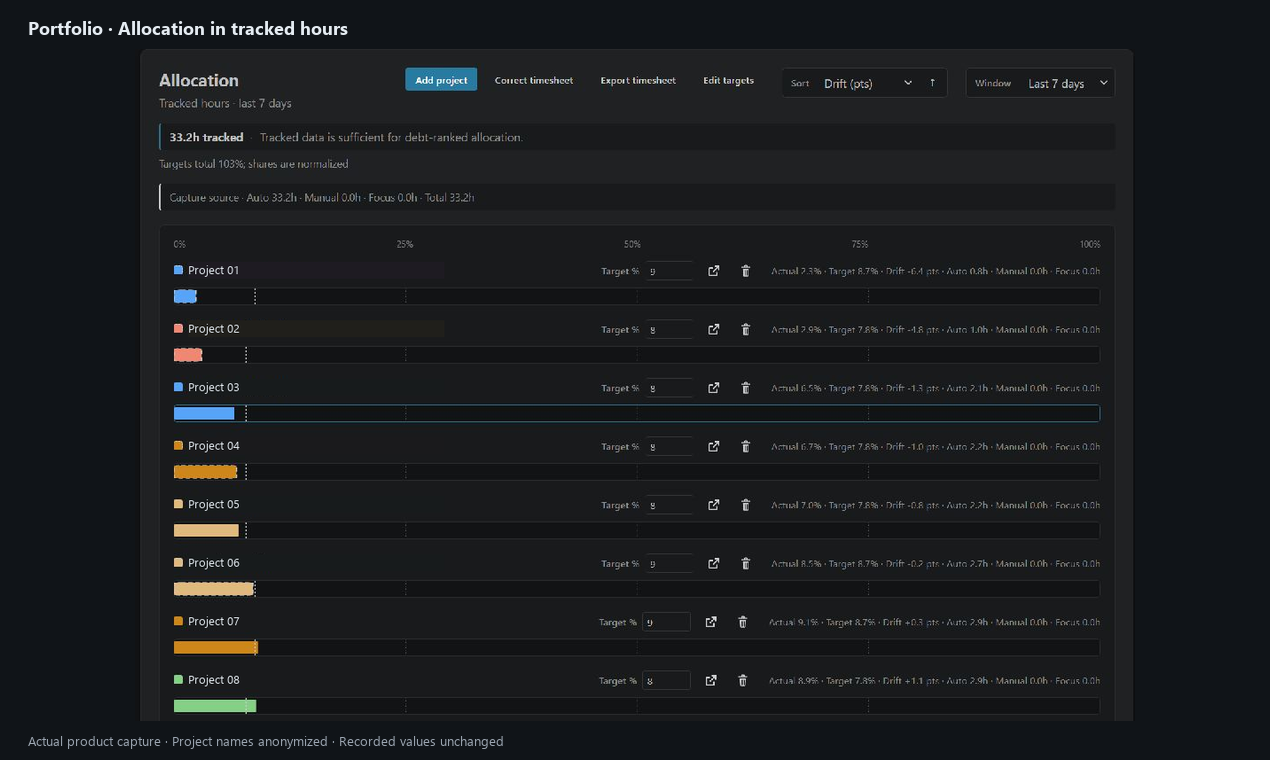
The Portfolio Allocation view in VS Code's dark theme, with anonymized project names, recorded hours, target shares, and drift. The visible projects span negative and positive drift, and a hint explains that target shares are normalized.
Portfolio and Allocation. Set the split you want, then see tracked hours, drift, and debt against it. Click a project to open it.
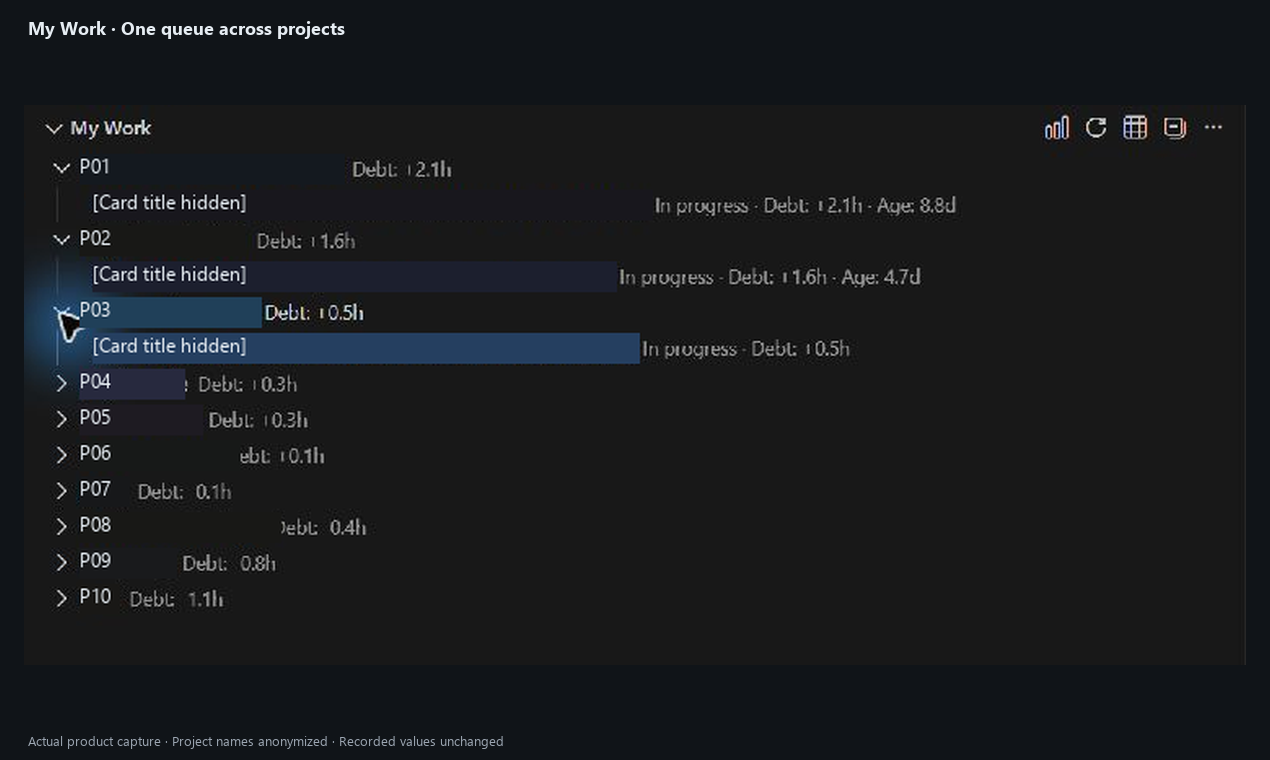
The My Work tree in VS Code, ordered by project debt. Three expanded projects show in-progress cards with their recorded debt and age; project names and card titles are anonymized.
My Work. One queue across every board, ranked by the project furthest behind its target.
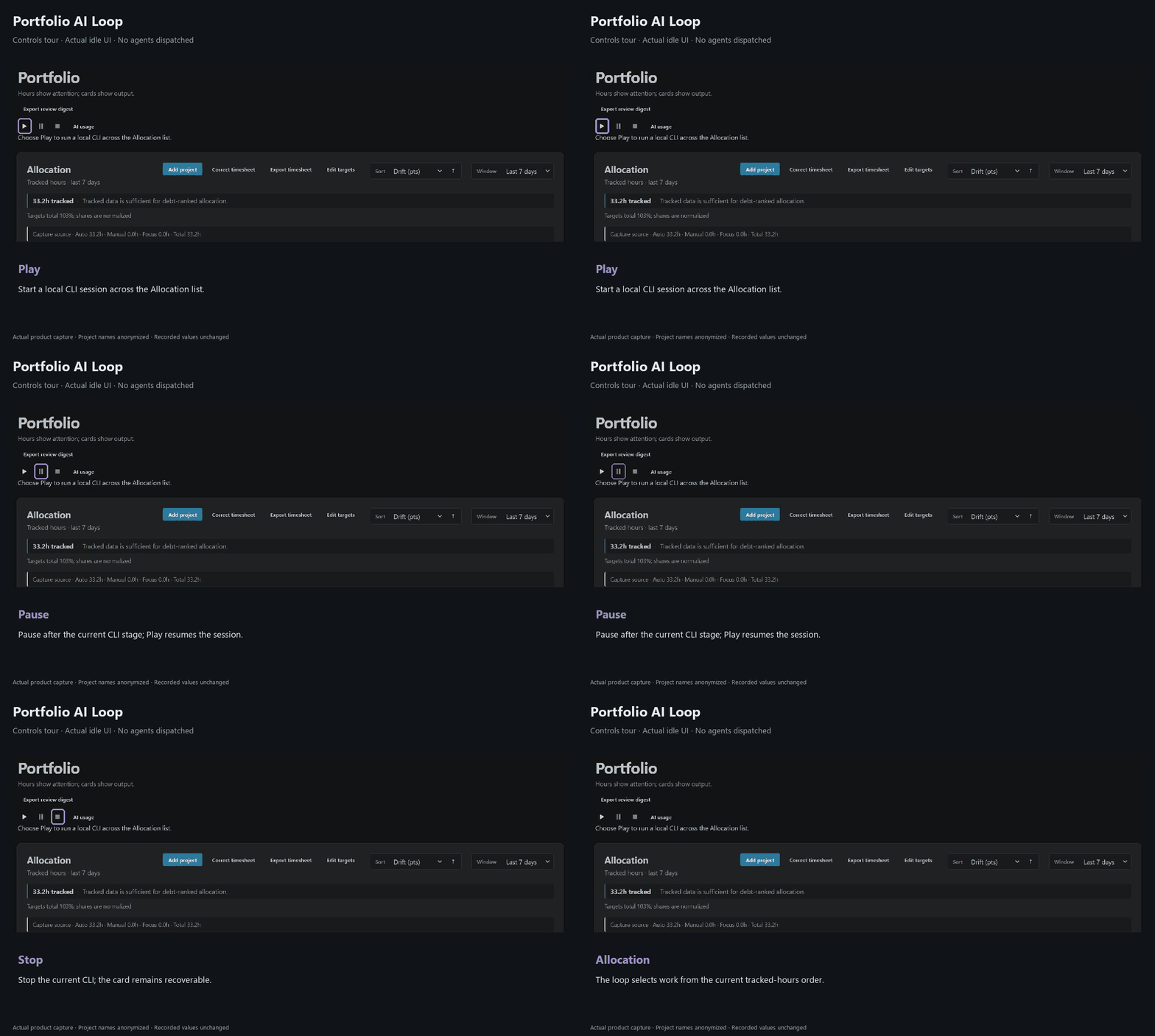
A labeled tour of the real Portfolio AI Loop controls: Play, Pause, and Stop, followed by an explanation of Allocation ordering. The captured interface is idle; no agents are dispatched in this animation.
Portfolio AI Loop. A tour of Play, Pause, and Stop. Run AI-assigned cards across registered projects under one dispatch budget, ordered by Allocation.
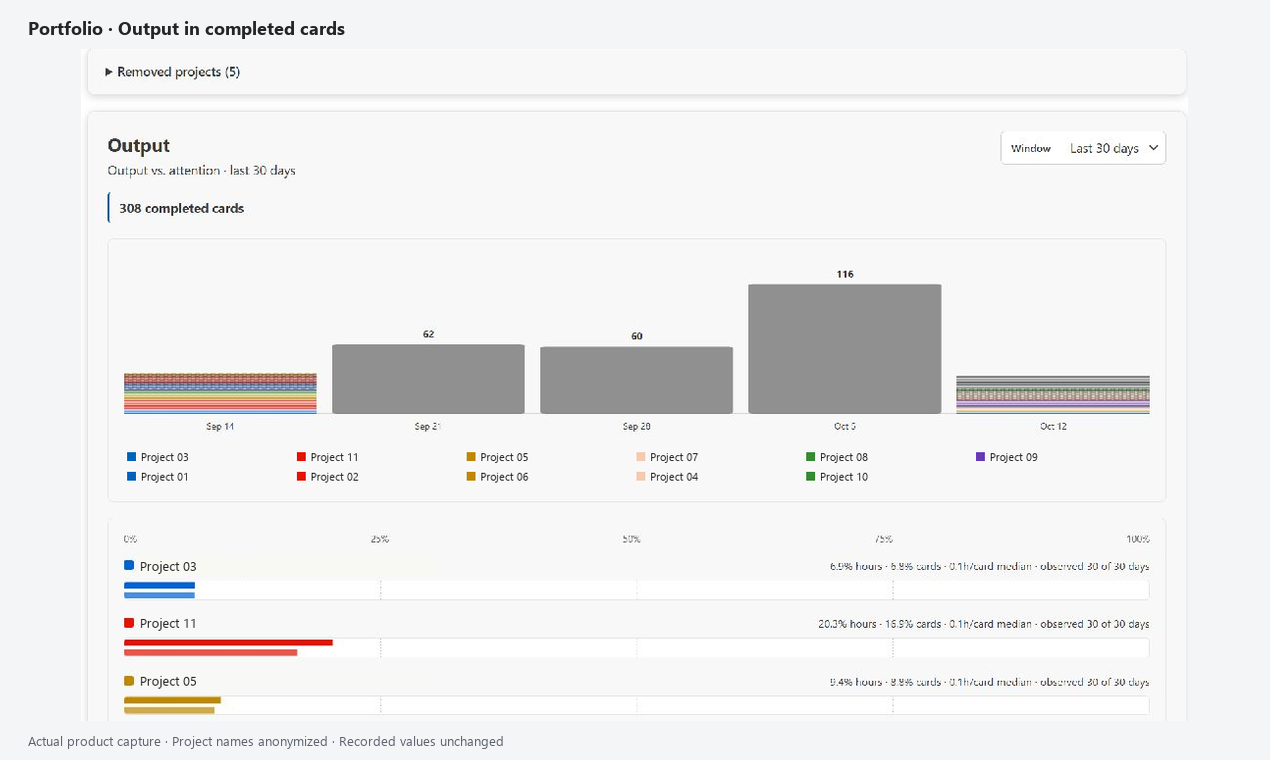
The Portfolio Output section in VS Code's light theme: recorded weekly throughput, completed cards, and hours per completed card with observed-day coverage. Project names are anonymized.
Output. Completed cards and hours per completed card, in a section of their own.
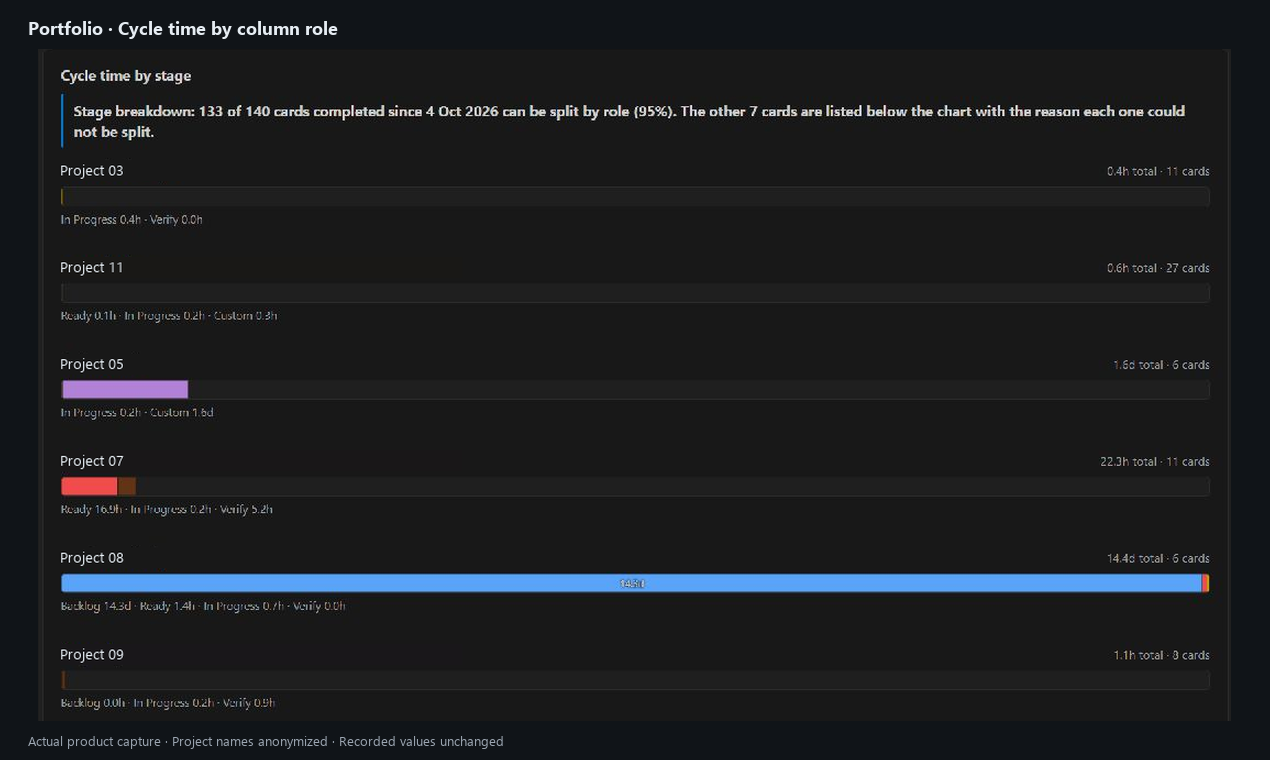
The Portfolio cycle-time stage breakdown, with one horizontal bar per anonymized project, durations split by column role, and a coverage note stating how many completed cards can be split by role.
Flow. Where cycle time actually goes, split by column role, with observed coverage stated.
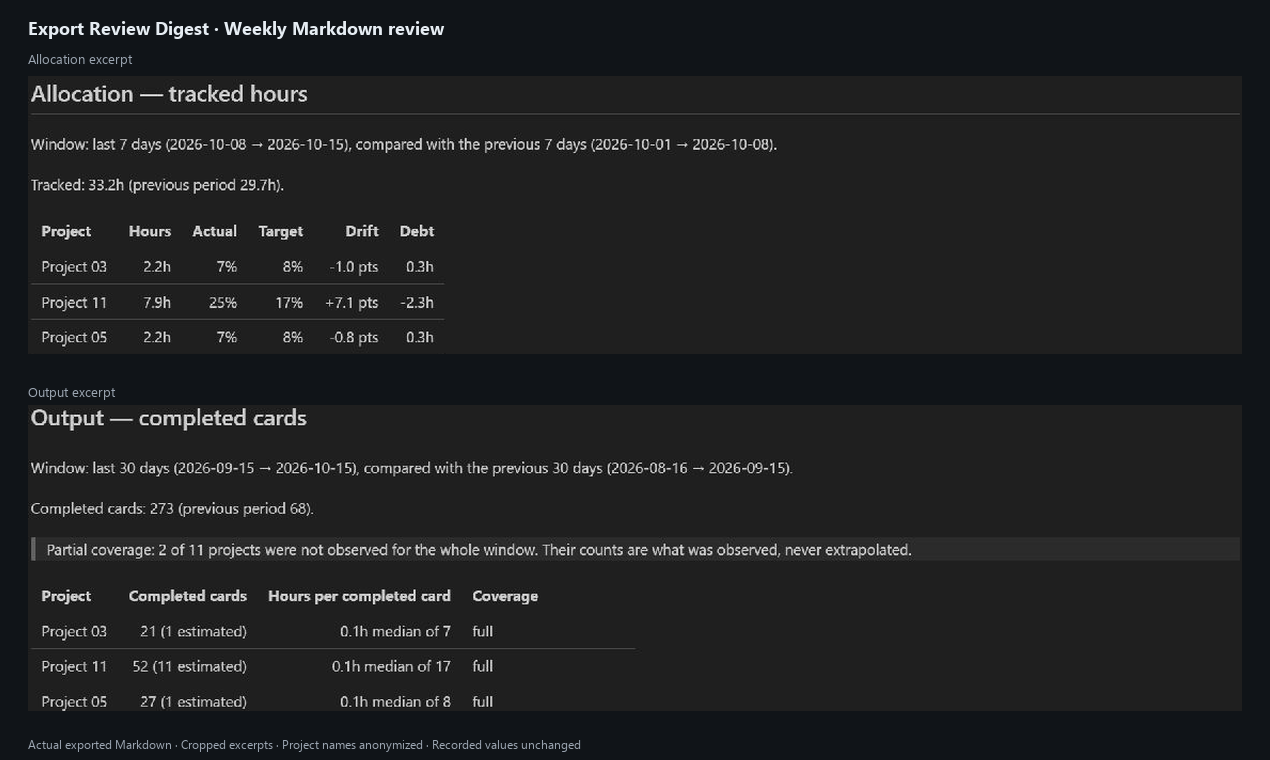
Two cropped excerpts from an exported weekly Review Digest in VS Code: tracked hours over seven days and completed cards over thirty days, each compared with its preceding period. Project names are anonymized and recorded values are unchanged.
Export Review Digest. A weekly, fortnightly, or monthly Markdown summary, saved only where you choose.

Answers a single board cannot

Pro turns activity from separate workspaces into a portfolio you can act on.

Allocation

Set the attention split you want per project, then watch actual hours, drift, and debt against it. Add, remove, and re-sort projects in place, and open any project straight from the dashboard; removed projects archive rather than disappear.

Output

Weekly throughput, completed cards, and hours per completed card — shown side by side with attention, never folded into one score. The Flow section breaks cycle time down by column role and marks aging work at p50 and p85.

Portfolio AI Loop

Run AI-assigned cards across every registered project, including folders you have not opened, with Play, Pause, and Stop, live project, card, and stage progress, and one shared dispatch budget. Each finished card refreshes the Allocation order.

My Work

In-progress, ready, blocked, and backlog cards from every board in one queue, ranked by which project is furthest behind its target.

Focus

Run a timed session on a single card with a live status-bar countdown, keep manual timers pinned across projects, and get rate-limited nudges when attention drifts.

Tracking that keeps up

Time is captured from real activity — including edits an AI agent or another tool makes in a registered project while you are elsewhere — with idle, debounce, and minimum-slice rules so build churn never counts as work.

Timesheets you can correct

Review recorded slices for any range, reattribute, retime, or drop them, and export to CSV. Corrections are appended, so the original record is never rewritten.

Review Digest

Export a weekly, fortnightly, or monthly Markdown digest with separate sections for tracked hours and completed cards, each compared with the previous period, plus in-progress cards aging past p85.
Two questions, two honest units. Allocation uses tracked hours; Output uses completed cards. Pro keeps them separate because card sizes differ and a blended score would obscure more than it explains.

Local-first, by design

Your boards stay in your repositories. Pro data stays in one per-user directory on your machine, shared by VS Code, VS Code Insiders, Cursor, and other VS Code-family editors, and is transmitted nowhere. No board, card, usage, or time data is transmitted to us. The only product network request is license validation with Polar, which receives the license key—not your work data. AI handoffs go to the chat extension or agent CLI you choose, under that provider's terms.

One extension. One Pro license.

Pro starts with a 14-day trial the first time you open a Pro feature — no card, no account, nothing to cancel. When it ends, a license key unlocks the same install.

Monthly

$4/month

Month to month. Cancel any time from the Polar portal.

Lifetime Founders

$49 once

The first 100 only. When they are gone the plan is withdrawn.

Polar handles checkout, receipts, license delivery, and the customer portal. Prices are in USD; local taxes are calculated at checkout.

Choose a plan on Polar